

Empowering Your Business
With Seamless Technology
Solutions
Your technology should work for you — not the other way around. We deliver managed IT and network services that keep your business running securely, efficiently, and confidently in an ever-changing digital landscape.

Navigating the Complexities of Modern Business Technology
Today's business environment is defined by rapid technological change, rising cybersecurity threats, and the relentless pressure to stay competitive. Managing IT infrastructure is no longer just an operational concern — it's a strategic imperative.


Escalating Demand
The need for robust, secure infrastructure continues to grow, placing enormous pressure on internal teams.

Cybersecurity Threats
Ransomware, phishing, and data breaches can cripple operations and damage reputations in an instant.

Cost of Downtime
Downtime and outdated systems lead to significant financial losses and erosion of customer trust.
Comprehensive IT Management
End-to-end managed IT and network services designed to optimize your technology operations from the ground up.

Proactive Monitoring
Continuous oversight of your systems to detect anomalies and resolve issues before they escalate into costly outages.

Strategic Planning
We align your IT investments with your business goals, building a technology roadmap that supports sustainable growth.

Rapid Response
When issues arise, our team responds quickly and decisively to minimize disruption and restore normal operations.
Preventing Problems
Before They Start
Reactive IT support is a thing of the past. We detect and address
potential issues before they impact your business.
- Real-time performance monitoring and alerting
- Scheduled system maintenance and health checks
- Automated security patches and updates
- Helpdesk support for your entire team
- Detailed reporting and IT health dashboards

The Backbone of Your Business
Your network is the foundation everything else runs on. We design, implement, and manage secure, reliable infrastructures tailored to your needs.

Assessment
Evaluate existing architecture to identify gaps, bottlenecks, and security vulnerabilities.
Design
Engineers craft a customized network design optimized for performance, security, and scalability.
Implementation
Deploy new infrastructure with minimal disruption, ensuring a smooth transition for your team.
Management
Continuous monitoring, optimization, and support keep your network performing at its best.
Protecting Your Most
Valuable Assets
A reactive security posture is no longer sufficient. We provide
comprehensive, multi-layered security solutions to safeguard your data
and business continuity.
Every solution we architect begins with security as a foundational
principle — not an afterthought.

Threat Detection
Advanced tools that identify suspicious activity and potential breaches in real time.

Prevention & Hardening
Firewalls, endpoint protection, and security policies that block threats before penetrating your systems.

Rapid Incident Response
Our team mobilizes immediately to contain, investigate, and remediate threats when an attack occurs.

Compliance & Reporting
Meet industry regulations with clear documentation for audits and governance requirements.
Scalability and
Flexibility for Growth
We help you harness the full power of cloud computing — delivering
flexibility, scalability, and cost-efficiency that positions your business for
sustainable growth.
- Cloud migration planning and execution
- Hybrid and multi-cloud architecture design
- Cloud security and compliance management
- Cost optimization and right-sizing
- Ongoing cloud infrastructure management
- Disaster recovery and backup solutions

Aligning Technology with Your Goals
Technology is only valuable when it drives business outcomes. We partner with you to develop a strategic IT roadmap.
Discovery
Deep-dive assessment of your current technology environment and business goals.
Strategy Design
Building a tailored IT roadmap that prioritizes initiatives for maximum business impact.
Implementation
Guided execution of strategic projects with expert oversight and change management.
Measure & Optimize
Tracking outcomes and continuously refining the strategy to ensure ongoing ROI.
Why Partner With Us?
Choosing the right managed IT partner is one of the most important decisions your business will make.
Deep Expertise
Our team of certified professionals brings extensive knowledge across a wide range of technologies, industries, and platforms — ensuring you always have the right expertise at hand.
Proven Reliability
We deliver consistent, high-quality service backed by defined SLAs and a track record of keeping businesses running smoothly.
Your Focus Restored
With your IT in capable hands, redirect energy toward what truly matters — growing your business, serving customers, and pursuing strategic goals.
Your Success is Our Priority
We go beyond ticket resolution and system uptime — we become a genuine
strategic partner who understands your business and anticipates your needs.

We don't just manage your technology. We take ownership of it — treating your systems, your data, and your uptime as if they were our own.
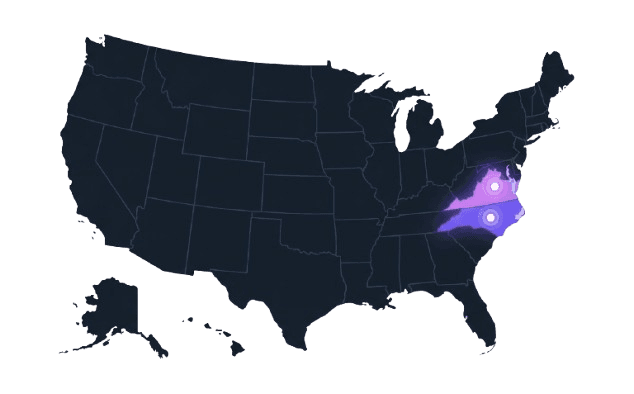
Locations We Serve
SoftwarePac delivers managed IT and technology services across Virginia and North Carolina. Select a city to learn how we support local businesses.
Let's Build a Stronger,
More Resilient Business.
The question isn't whether you can afford managed IT services — it's whether you can afford not to have them.
Schedule A Free Consultation
Talk to one of our experts and discover how we can transform your IT environment.

Request an Assessment
Get a comprehensive review of your current IT infrastructure at no cost or obligation.
Become a Partner
Join the growing number of businesses that trust us with their most critical technology.